Make Money with AI-Powered Workflow Automation Services
What Is AI Model Flexibility, and Why Does It Matter for B2B Efficiency?
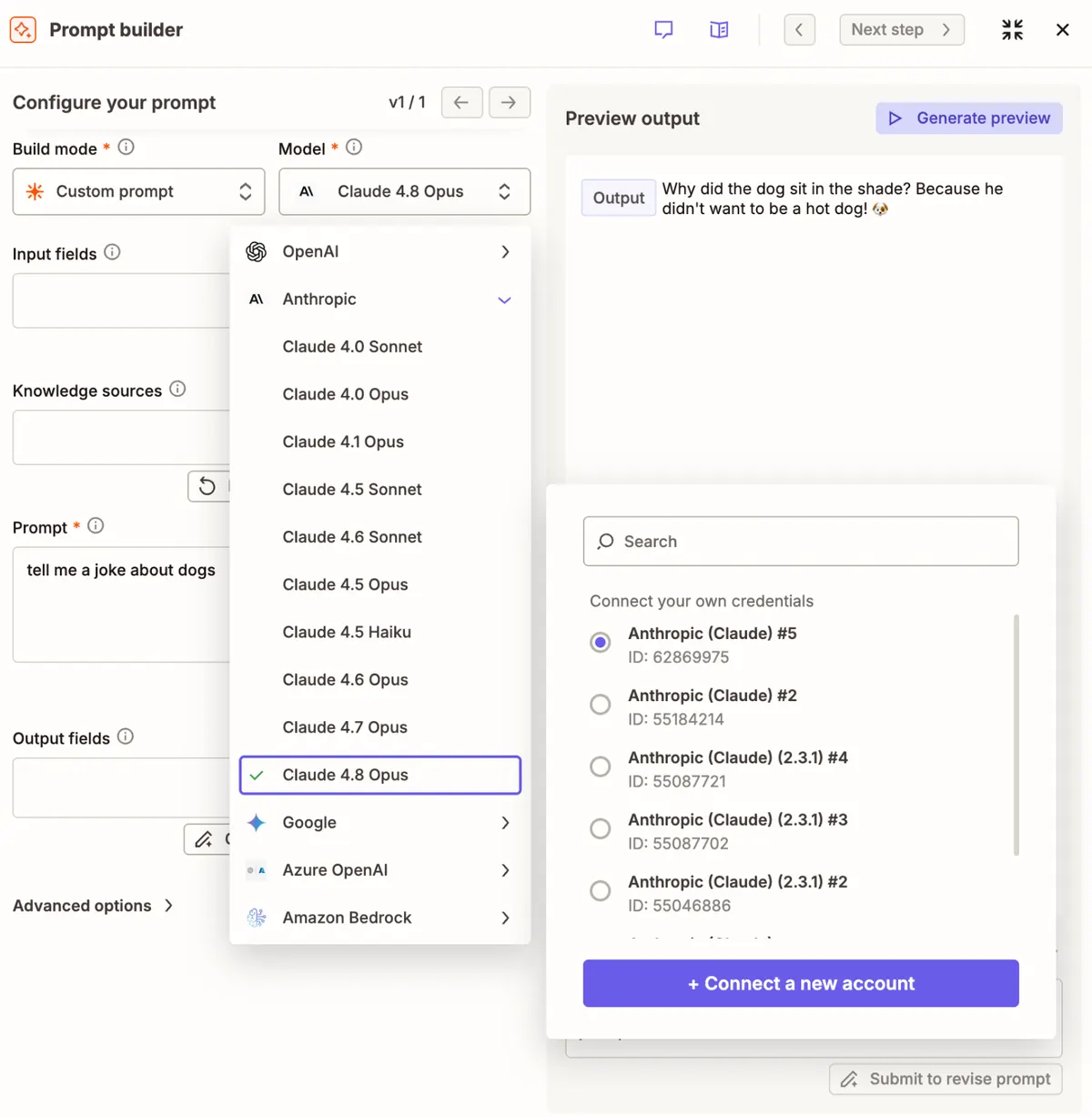
As AI adoption accelerates across industries, far too many businesses make a critical early misstep: tying every AI-powered workflow to a single provider. This “one model fits all” approach creates unnecessary lock-in, forces teams to compromise on tool performance, and leaves your operations vulnerable to pricing shifts, policy changes, or new model releases that make your existing stack obsolete. For teams focused on long-term B2B efficiency, AI model flexibility is no longer a nice-to-have—it’s a core requirement for building resilient, scalable automation systems.
When your automation stack is locked to a single provider, every team has to compromise on the tools that work best for their specific tasks. If that provider raises prices, updates their terms of service, or releases a underperforming model update, you’re stuck rebuilding entire workflows from the ground up—eating into valuable time and budget that could be spent on core business goals.
The Hidden Costs of Single-Vendor AI Dependency
Many leading AI providers are now pushing full-stack platforms designed to keep users locked into their ecosystem. For example, OpenAI’s Frontier platform is built to deploy and manage AI agents across entire business operations, which creates deep, hard-to-break lock-in for teams that build directly on its tools. This lock-in creates three core risks for business operations:
- Inflexible tooling: Your team can’t leverage new, higher-performing models from competing providers without rebuilding your entire automation architecture.
- Compromised output quality: Teams have to use a single model for every task, even if it’s poorly suited for their specific use case, leading to lower-quality work and slower output.
- Unplanned cost increases: If your provider raises API pricing or changes usage policies, you have no easy alternative without reworking your workflows, leading to unexpected expenses and downtime.
For growing businesses, these risks add up fast. A single workflow rebuild for a core business process can cost thousands of dollars in labor and lost productivity, not to mention the opportunity cost of delayed projects.
How to Build Scalable AI Automation With Multi-Model Flexibility
The solution to these risks is an interoperable AI orchestration layer that lets you mix and match models from any provider, no lock-in required. Zapier is the most widely adopted platform for this use case, integrating with thousands of apps from partners including Google, Salesforce, and Microsoft, plus direct connections to every major AI provider. This lets you build secure, automated AI-powered workflows across your entire tech stack, without tying your operations to a single vendor.
On Zapier, you have two core options for integrating AI models into your workflows:
- AI by Zapier: This built-in tool lets you add AI steps to any Zap, with a simple dropdown menu to select your preferred model for each task. You can swap models in seconds if a new release better fits your use case, no rebuilding required.
- Direct provider integrations: If you need access to niche actions or configurations only available on a specific provider’s native platform, you can connect directly to that provider’s Zapier integration for full access to their unique features.
This flexibility makes LLM orchestration simple: you can route different tasks to different models in the same workflow, based on triggers you define. For example, you can build a customer support workflow that routes simple FAQ tickets to GPT for quick responses, escalates long, nuanced complaints to Claude for drafted personalized replies, and sends Spanish-language tickets to Gemini for accurate multilingual triage—all in a single, unified automated flow.
Practical Steps for AI Workflow Optimization
To get started building flexible, resilient AI workflows, follow these actionable steps:
- Audit your team’s current AI use cases: List every task your team currently uses AI for, note which models your teams prefer, and identify gaps where your single-provider setup is underperforming. For example, if your support team is struggling with multilingual ticket triage on your current model, that’s a clear use case for Gemini.
- Map tasks to the best-fit model: Match each use case to the model that performs best for that specific task. Prioritize performance over consistency across your entire stack—it’s better to use the right tool for each job than force a single model to handle every task poorly.
- Build modular workflows with per-step model selection: When building Zaps, avoid hardcoding a single model to every AI action. Use the dropdown selector in AI by Zapier to assign the right model to each step, so you can swap models later without reworking your entire workflow.
- Add automated routing logic: Use Zapier’s built-in logic tools (like filters and paths) to automatically route tasks to the right model based on predefined rules. For example, set a rule that sends all support tickets with attachments to Claude for analysis, and all short, text-only tickets to GPT for quick responses.
Teams that implement this kind of flexible AI automation typically see 15-20 hours of recovered labor per employee per month, translating to roughly $1,200 to $1,600 in annual recovered labor costs per team member at average U.S. hourly rates, while also improving output quality across the board.
Long-Term B2B Efficiency Gains From Flexible AI Automation
Beyond immediate time and cost savings, flexible AI automation delivers long-term strategic benefits for business operations. First, you eliminate vendor lock-in risk: if a provider raises prices, changes their policies, or releases a subpar model update, you can swap to a better alternative in minutes, with zero downtime for your core workflows. Second, you empower every team to use the tools that work best for their specific needs, boosting adoption rates and output quality across the board. Third, your workflows stay optimized as the AI landscape evolves: you can test new models as they drop, add them to your roster, and assign them to the tasks they excel at, without reworking your entire automation stack.
For businesses looking to scale their operations, this flexibility is a game-changer. You can add new use cases, new teams, and new AI capabilities to your workflow stack without rebuilding your core automation infrastructure, letting you move faster than competitors who are stuck tied to a single AI provider.