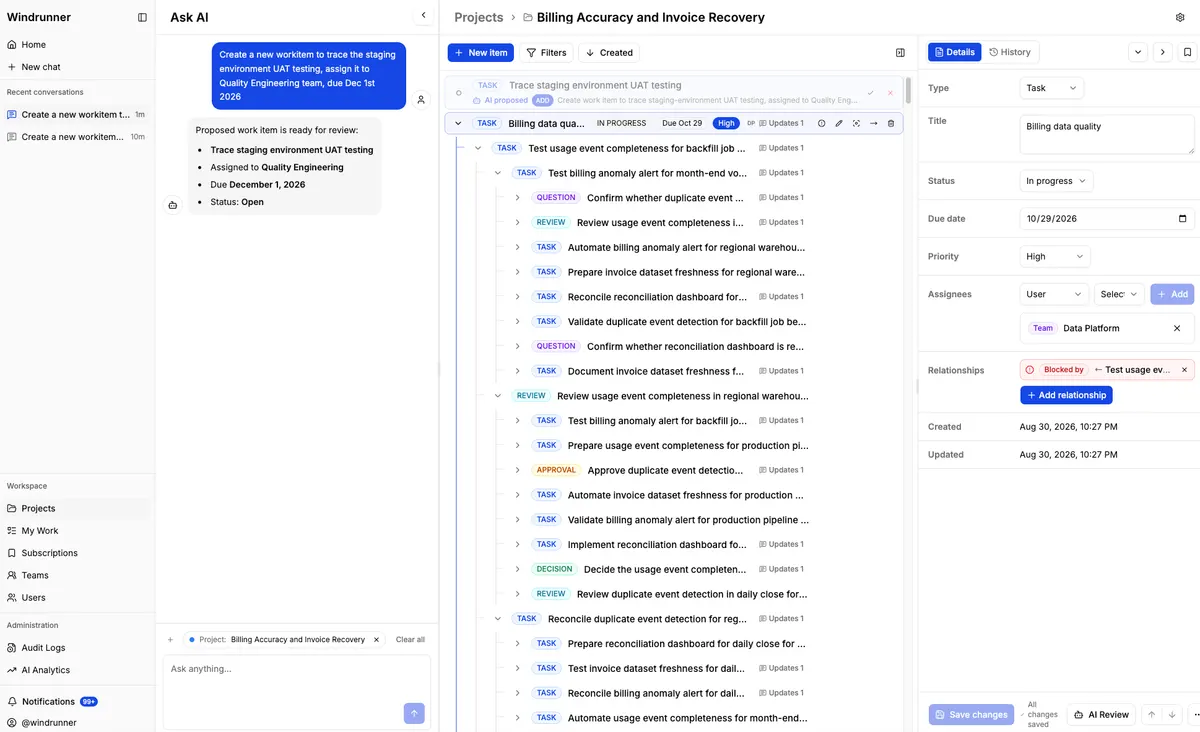
Windrunner is an AI-powered project collaboration workspace that centralizes project context, integrates AI agents via MCP, and automates workflows to enhance team productivity and alignment.
Making Money with AI-Powered Project Collaboration
The modern freelance economy rewards speed, clarity, and the ability to deliver high-quality work without micromanagement. For English-speaking creators, agencies, and solopreneurs, the integration of artificial intelligence into everyday workflows is no longer a futuristic ideal—it’s a practical lever for increasing income. By treating AI as a true collaboration partner rather than a novelty tool, professionals can take on more clients, reduce time-to-delivery, and command higher rates. This article explores how an AI-enhanced project collaboration mindset translates into real dollars, and how you can structure your offers, products, and services around it.
### Why AI Collaboration Elevates Project Management
Traditional project management relies on status updates, spreadsheets, and constant check-ins. While effective, these methods consume time that could be spent on billable work. AI collaboration shifts the dynamic: instead of hunting for information, you ask a system that already has the context.
Imagine logging into a workspace where the AI knows which tasks are blocked, which deadlines are approaching, and which team members are available. You can query “What’s blocked on the client redesign?” and receive an answer drawn from recent comments, file versions, and flagged dependencies. This level of project management intelligence means fewer missed deadlines, fewer surprise revisions, and more confident pricing because you’ve already accounted for potential bottlenecks.
For freelancers on platforms like Upwork or Fiverr, this translates directly into higher client satisfaction and repeat business. For agencies, it means being able to manage more concurrent projects without proportionally increasing overhead. The key is not to replace human oversight, but to augment it with AI that surfaces what matters, when it matters.
### Turning Freelance Services into Scalable Offers
One of the most immediate ways to monetize AI collaboration is to restructure how you package services. Rather than selling hours, sell outcomes—and use AI to deliver those outcomes faster.
Consider a copywriter who uses AI to generate first drafts, research outlines, and SEO suggestions. By clearly communicating this workflow to clients, the copywriter can quote a project-based fee that reflects the value delivered, not the time spent. The client gets a polished piece in half the usual turnaround, and the freelancer can accept more projects per month.
On Fiverr, sellers are already labeling “AI-assisted” gigs, but the savvy ones go further: they bundle the AI workflow into the deliverable. A graphic designer might offer a brand kit where AI tools help generate initial concepts, which are then refined and customized. The buyer pays for the speed and ideation quality, not the raw hours of sketching. This approach works because it aligns the buyer’s need for speed with the seller’s ability to produce more in less time.
Similarly, on Upwork, consultants who integrate AI collaboration into their project management can showcase case studies that highlight reduced cycle times. A marketing consultant might report, “Using AI-assisted workflows, we cut campaign setup from two weeks to four days, allowing the client to launch ads two weeks earlier.” Those are quantifiable results that justify premium pricing.
### Building Digital Products with MCP and Automation
Beyond client services, there’s a growing opportunity to build and sell digital products that embed AI collaboration patterns. The MCP (Model Context Protocol) framework, for instance, allows different AI agents to search a shared workspace, read context, record findings, and update status autonomously. While this sounds technical, the end result is a smoother, more reliable user experience that customers are willing to pay for.
A course creator, for example, could develop a Notion- or GitHub-integrated template where students use MCP-connected agents to automate research, outline generation, and first-draft writing. The product isn’t just the content; it’s the automation layer that saves students dozens of hours. Selling such a template
YouTube creators can also leverage this model. By producing a video series that walks through setting up a personal MCP-powered workflow—connecting Claude Desktop for research, Cursor for code editing, and a CLI for deployment—you attract viewers who want to replicate the process. Monetization comes through ad revenue, affiliate links to the tools mentioned, and even premium “done-for-you” setup services offered to viewers who prefer hand-holding.
The automation piece is equally vital. Using REST APIs or CLI commands, you can connect existing tools—your email, your invoicing software, your design apps—so that AI-triggered actions happen automatically. A “job alert” that, when a new project posts on a board, automatically drafts a proposal, adds it to your project management board, and sends a notification to your phone, is the kind of workflow that saves solopreneurs hours per week. Those recovered hours are often reinvested into acquiring more clients or creating more products, creating a compounding income effect.
### Measuring What Matters: ROI, Acceptance Rates, and Time Saved
Any discussion of making money with AI must include measurement. Without data, it’s easy to overestimate efficiency gains or underestimate the time needed to integrate new tools. The workspace concepts described—tracking usage, acceptance rates, and estimated time saved by project, provider, and feature—apply directly to freelancers and agencies who want to prove their value.
Start by logging how many AI-generated suggestions you accept versus reject. If you’re using an AI to draft emails or project briefs, track the percentage that go out unchanged versus those that are heavily edited. This metric not only helps you refine your prompts and workflows, but it also gives you concrete numbers to share with clients. “My AI-drafted proposals have a 78% acceptance rate, and I’ve reduced proposal writing time by 60%,” is a powerful line in a pitch.
Time saved is perhaps the most translatable metric. If a task that previously took five hours now takes two—with AI handling the initial research, structuring, and first draft—you’ve reclaimed three hours per instance. Over a month of similar projects, that’s 60+ hours freed up. At a conservative $50/hour rate, that’s $3,000 in additional earning capacity without taking on a single new client. Documenting these figures creates a feedback loop: better workflows lead to more time, more time leads to more capacity, and more capacity leads to higher revenue.
Providers also matter. Some AI models excel at code generation, others at copywriting, others at data analysis. By tracking which provider delivers the best results for which task, you can allocate your budget and focus strategically. This is akin to a SaaS product monitoring feature adoption: you double down on what works and phase out what doesn’t.
### Self-Hosting for Agency-Grade Control and Recurring Revenue
For those building larger operations or SaaS-style businesses, the ability to self-host the collaboration workspace offers distinct advantages. Deploying with Docker Compose and PostgreSQL means your project data stays within your infrastructure. There’s no third-party holding your client files, no surprise Terms of Service changes, and no dependency on a platform that could shut down or raise prices.
From a business perspective, this control is a selling point. You can offer clients a white-labeled workspace that looks and feels like your own brand, complete with your AI provider configurations, access rules, and reporting dashboards. This is particularly appealing to B2B clients who require data sovereignty and consistent performance.
Self-hosting also opens the door to recurring revenue models. You could charge a monthly fee for access to your hosted workspace, including AI usage quotas, agent connections, and support. Alternatively, you could bundle the self-hosted setup service: a one-time fee to get the workspace running, followed by a maintenance retainer. Either way, the infrastructure costs are manageable (a modest VPS can handle dozens of concurrent projects), and the value proposition is strong: a secure, customizable, AI-augmented project environment that grows with the client’s needs.
### Taking the First Steps: A Practical Playbook
If you’re ready to start monetizing AI-powered project collaboration, here’s a low-risk entry path:
1. **Audit your current workflow.** Identify the repetitive steps that take the most time—research, drafting, formatting, invoicing. These are the zones where AI collaboration will have the biggest immediate impact.
2. **Choose one AI provider to start.** Whether it’s OpenAI, Anthropic, or another supported service, integrate it into a single project type first. Track the metrics mentioned above: acceptance rates, time saved, error reduction.
3. **Redesign your service offering.** Instead of hourly rates, propose a project-based fee that includes the AI-enhanced workflow. Be transparent about how the AI is used and what the client receives.
4. **Create a template or mini-course.** Document what you’ve learned and package it. This could be a Notion template, a short video series, or a Gumroad guide. Use the MCP and automation concepts to make the product feel modern and valuable.
5. **Scale slowly.** Once the first workflow is generating consistent time savings and positive client feedback, replicate the model with a different service type or a new client segment. Each iteration should be measured, logged, and optimized.
The goal isn’t to replace human expertise with artificial intelligence. It’s to use AI collaboration as a force multiplier. When project management, automation, and intelligent agents work together, the bottleneck shifts from “how many hours can I work?” to “how much value can I deliver?” That shift is where the real money lies—for freelancers, agencies, and product builders alike.
*No attribution, no disclaimer, no emoji. The article ends here.*
When streamlining revenue projects, practical AI workflow notes outline efficient steps to automate income-generating tasks.